Promotion


FLV Editor Pro
FLV Editor Pro is the fantastic conversion tool for edit FLV. Along with the program, you can convert FLV to AVI, FLV to MPEG, FLV to MP4, FLV to WMV, FLV to MP3, et as well as edit FLV by its powerful editing functions.

Have you ever been looking for a FREE trim FLV tool? Do you want to just trim FLV for output without altering it?
Sometimes the smaller FLV or only the excellent parts during the whole video clip is needed. A free FLV trimmer will meet all requirements.
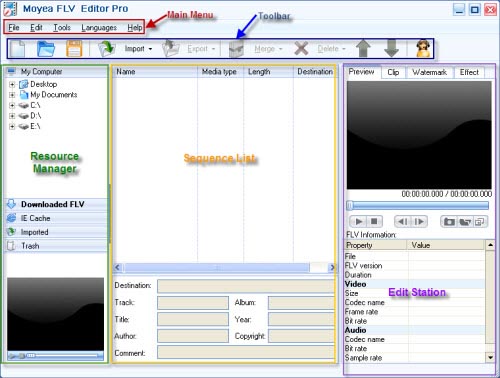
Moyea FLV Editor Pro is the powerful conversion tool including batches of editing functions. Most attracting thing is that it provides free trimming function without recoding. No watermark. No interferential sound. No time limit.
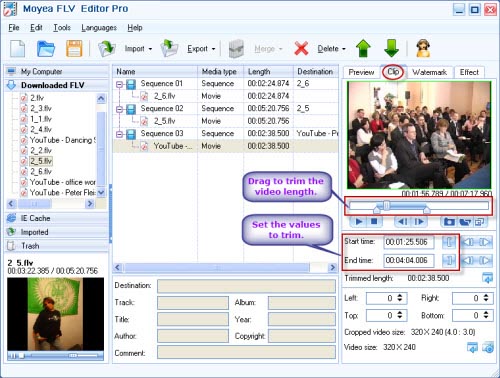
After importing FLV files, just click “Clip” tab. Here you can trim FLV.
Two methods to trim:
- Drag and drop the slide bar to trim the video length. That is very convenient for you. But maybe it is not so precise. If you want more accurate trimming, use the second method.
- Type in the accurate values in the input box and click the “Enter” key on the keyboard to specify it. Meanwhile you also can trim FLV by each frame to get FLV clips you want.
Output settings:
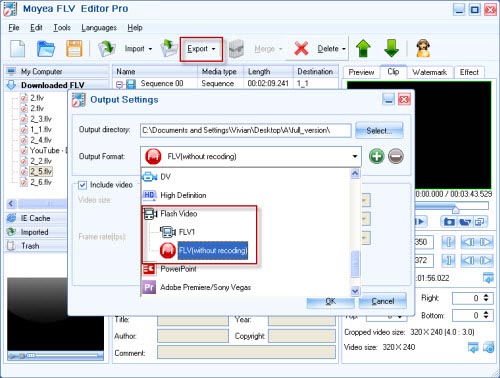
Click “Export” button to export. In “Output Settings” window, first specify the location of trimmed FLV files and choose output format: FLV without recoding. Click “OK” and it will be done.
Besides offering free FLV trimming, FLV Editor Pro provides free merging FLV function and free extracting audio from FLV video clips.
Tips
- Create FLV - Tell you how to get flv with Flash Video MX
- How to convert MKV to VOB with Moyea MKV Converter?
- Convert FLV to AVI with XviD video code video with half of its sizec to enjoy a DVD quality
- Choose the Right Tool to Record Flash Video Online
- Best way to convert FLV to WMV for Sony Vegas
- Extract YouTube Flash Video FLV to mp3 for Creative Zen Neeon 2 MP3 player
- AVCHD to Sony Vegas - Convert/Edit AVCHD MTS/M2TS files for Sony Vegas
- Flash Video Converter - Make Flash SWF, Flash Video file with Flash Video MX Pro
- FLV to iAudio : Convert FLV to iAudio with Moyea FLV to Video Converter
- AVCHD videos playback&New Apple iPod Touch - You will forget it is an iPod