Promotion


FLV Editor Pro
FLV Editor Pro is the fantastic conversion tool for edit FLV. Along with the program, you can convert FLV to AVI, FLV to MPEG, FLV to MP4, FLV to WMV, FLV to MP3, et as well as edit FLV by its powerful editing functions.

How to Free Merge FLV
How to merge multiple FLV files into one movie to watch? Is there a question mark in your mind when you enjoy video clips of a hot movie on YouTube or just want to merge local FLV files into a funny and creative video? It is not hard as long as you have the desirable FLV merging tool.
Moyea FLV Editor Pro is the powerful conversion and editing software. However, if you do not need conversion function and just require FLV merging feature, FLV Editor Pro is a free tool to merge FLV for you. Download the trial version and get it with free function: Join and merge FLV. Since it is a free function, then there is no watermark or interferential sound.
Now let’s learn about how to merge FLV for free:
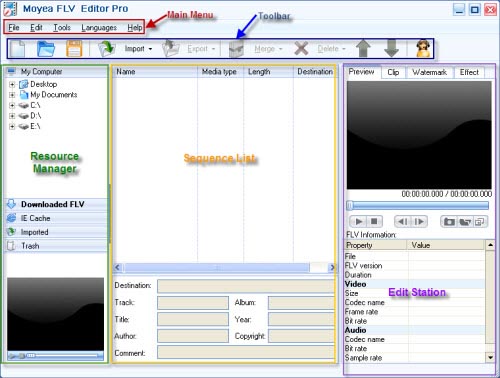
Double click the blank area of the sequence list to import local FLV to the program. Or run FLV Downloader by hitting Tools icon. The downloaded FLV files will appear in Downloaded FLV tab. You can drag FLV directly to the sequence list for input.
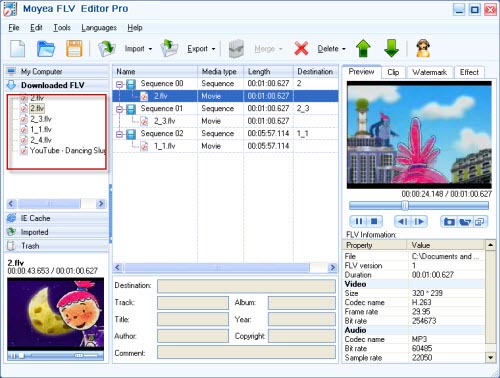
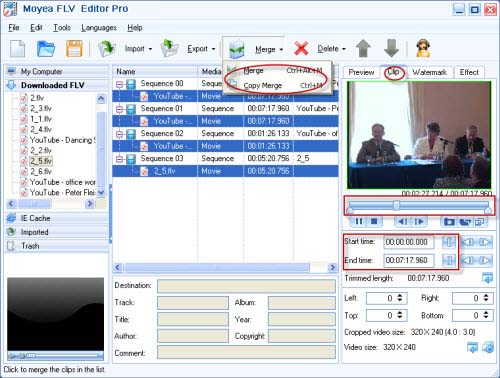
Select more than one video clip and click Merge icon. (Note: select video clip and not the sequence). You have two choices: Merge or Copy Merge. Merge option indicates you choose cut and merge FLV while Copy Merge stands for copying and merging FLV. If you want to trim FLV length, drag the slide bar to set it. This is also a free function.
This program provides many output formats. But for free function: Merge FLV, you can only choose to generate FLV without recoding. It means if your original FLV is encoded with flash 8, then the output FLV is still encoded Flash 8. Just merge FLV into one movie for continuous enjoying without any interruption.
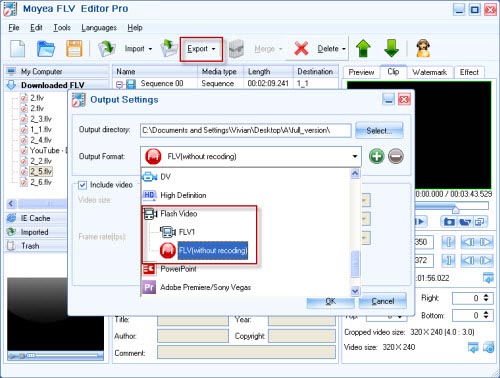
Click Export icon to output, specify where to save your merged FLV on your PC and choose the option: FLV without recoding. If you want to edit later, you can save it as a project file ending with *.ftvx.
Tips
- AVCHD to YouTube - Upload AVCHD videos on YouTube for sharing
- Flash Video Converter - Convert F4V to SWF, F4V to FLV
- Best FLV Downloader - Download Halloween video from website
- FLV to Xbox - Convert FLV to WMV for XBox
- Free Dailymotion Video Downloader - Capture and save videos from Dailymotion
- Free FLV Youtube Downloader - 100% FREE YouTube Downloader
- Refreshing experience of playing back FLV files with Moyea FLV Player
- How to Play FLV files Online with Moyea Flash Video MX
- Free Flash Video Downloader - Free download videos from Google
- Convert Flash Video FLV from YouTube to MP4 for iPod Nano