 Promotion


YouTube FLV Downloader Pro (YouTube Converter)
The powerful FLV Downloader will not only capture and download the video clips from those online video-sharing website, but also can convert flash video to other format with ease so you can easily enjoy those videos on your portable devices like iPad, iPo

Hi, guys. It's the time again, Halloween is here! Funny or Scary, are you ready to enjoy? Every year, lots of people like to use their camcorder to record those wonderful moments and then upload to the Internet for sharing. Searching online, you may find lots of video clips about the Halloween. Then when you get some clips that are quite interesting, do you want to save them for easily playback offline? Or want to download to your iPad, iPhone 4, iPod Touch?
It will be not such a difficult thing. With the powerful Flash Video Downloader, you can download as many Halloween video clips as you want. Moreover, the built-in video converter can help you convert any videos in your computer to most other format. The UPnP connectivity function allows you to enjoy/share those downloaded flash videos on other UPnP supported devices. Gorgeous, right? Then what are you waiting for, let’s go!
Step 1: Download the trail version of the Online Video Downloader here. Install and run it.
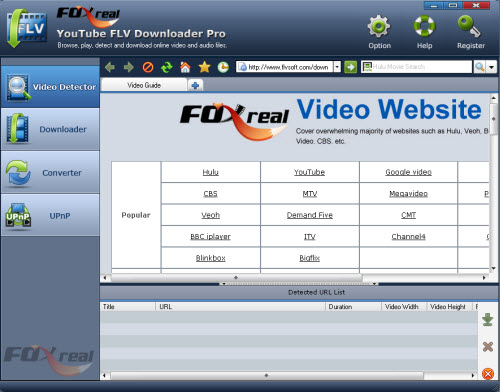
Step 2: Open the Online Video Website you want to save
You can open the video website you want to watch in the built-in browser. Just enter the address of the webpage. In fact, there is a powerful video website library, which covers overwhelming majority of websites such as YouTube, Facebook, Myspace, Veoh, Yahoo Video, Dailymotion, Metacafe, MSN, etc. You can directly click one to open. Several webpages can be opened at the same time.
Step 3: Create download task.
When you open and play one Halloween video, the program will auto-capture the URL of the video you are watching. The URL will be saved in Detected URL List. You may choose the video you want to download. And click start button to create a new flash video download task.
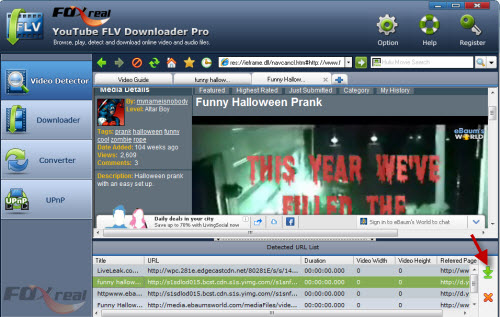
Step 4: Start to download Funny Halloween Prank.
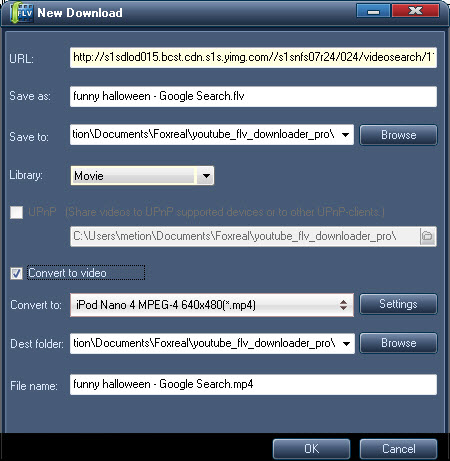
Enter the specific information in the pop-up window. You can rename the video file, set destination folder for the downloaded file and converted file, enable converting and UPnP connectivity function, etc. Once finished all settings, click “OK” to start to download.
Then it turns to Downloader section, where you can get more detailed information about the process including video size, elapsed time, time remaining, downloading speed etc. If you enable the “Convert to video”, the program will process the download and converting at the same time.
Step 5: Play Halloween videos offline.
After the files are downloaded and converted, you can find the video clips in the destination folder. Then you can use for your own purpose. The powerful FLV Downloader has a built-in video player with which you can easily playback those videos. Or you can transfer the converted file to other portable devices for enjoying.
PS: The great video converter will not only convert the video you downloaded, but also support importing other files from your computer.
Useful Tips:
Free YouTube Downloader, YouTube Grabber, YouTube FLV Free download, Free FLV Downloader, Download Google video, Save Metacafe Video to your PC, Free download Dailymotion Flash video, Capture streaming video for free, Save Flash video on PC, Download online video free, Watch FLV on iPod, Capture/Save Internet video, Download Flash Video, Free download NBA highlights
Tips
- Convert FLV for Windows Media Player
- Convert Flash Video FLV from YouTube to wmv for IUBI S60
- FLV to Droid X - Convert FLV to Droid X with Best FLV to Droid X Converter
- Free Flash Video Downloader - Free download videos from Google
- Best solution to convert FLV to DVD
- How to Convert Youtube Video FLV to WMV for Playback on your Creative Zen?
- Best Solution to Free Download YouTube Videos
- Convert YouTube FLV Videos to AVI, MP4 or MPEG
- How to Pick a Best FLV Viewer
- MOV to FLV Encoder - Convert mov to flv with Flash Video MX
Ready to Try or Buy ?
 (Price: $35.00)
