Promotion


MTS/M2TS Converter
Pavtube MTS/M2TS Converter is an friendly, stable and powerful tool to help you enjoy high-definisiton MTS/M2TS videos from AVCHD folders or Blu-ray movies anywhere anytime on your iPad, iPhone, iPod, BlackBerry, Nexus One, HTC, etc easily.

Do you want to compress or convert M2TS files from your AVCDH camcorder or Blu-ray backup files? The tutorial will show you the best solution to convert M2TS to MKV file with excellent output quality.
First of all, to choose a good M2TS to MKV Converter is necessary. Here I recommend this one – Moyea M2TS Converter for its super high fast conversion and optimized options for converting.
Preparation: Free download this M2TS Converter tool here, install and run it.
Step 1: “Add” M2TS files into this program
Step 2: Select output format as MKV or HD MKV
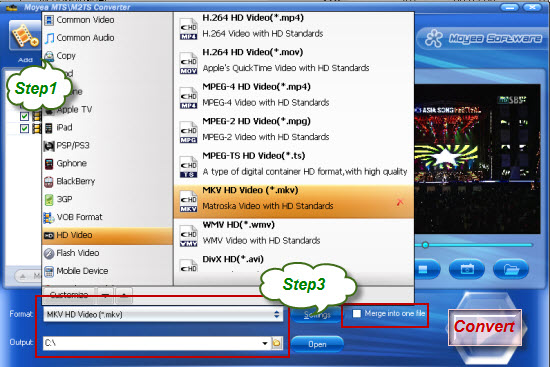
After loading all your M2TS files into it, you can choose your desired output format from “Format” as well as set save-path.
Step 3: Customize audio and video parameters
Settings – after clicking the icon, a profile window will show. Just adjust these parameters to get the best video quality to best meet your needs. If you want to keep the settings for next use, please remember to hit “Save as” icon to make it default.
Step 4: Edit your videos
Edit – by clicking the icon, you can open the edit panel which allows you to edit your videos with certain powerful editing options, such as crop, trim, add watermarks/special effects, replace audio, deinterlacing and so on. If you want to apply all the operations to the entire video, just need to hit “Apply to All”.
Merge into one file – tick the checkbox, you can join or combine all your videos into one with ease.
Step 5: “Convert” to start M2TS to MKV conversion
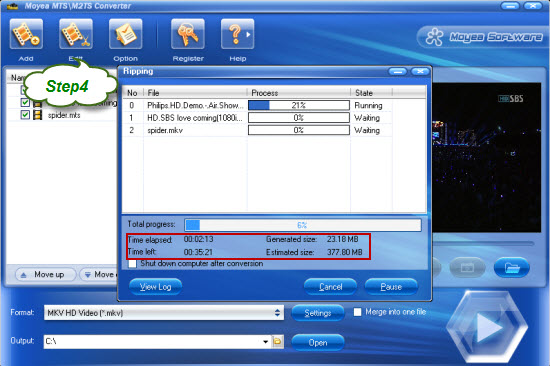
Once all the settings are done, please be patient for a little while. Then you will get the MKV files without quality loss from its destination.
That’s all. Hope it helps!
Tips
- Video to Flash Encoder - Convert MPEG to Flash with HTML file ready for the web
- How to Convert Youtube Video FLV to MPEG for Playback on your Samsung BDP-1400 Blu-Ray DVD Disc Player?
- Best AVCHD to DVD Converter - Convert MTS to MPG, Convert M2TS to MPG
- Open Source about FLV Player
- Grab YouTube and Save Them on Your PC for Free
- YouTube Grabber - Grab YouTube FLV Videos Correctly
- FLV to DS : Convert FLV to DS with Moyea FLV to Video Converter
- AVCHD to YouTube - Upload AVCHD videos on YouTube for sharing
- FLV Converter for Mac and Microsoft Windows
- F4V to AVI - Convert F4V to AVI without quality loss