 Promotion



YouTube FLV Downloader
This all-in-one downloader is featured by multi-threading and automatic URL parsing, and can record and download FLV from all sites effectively. It is 100% free!
Nowadays, it is not a fresh thing any more to grab YouTube or other online videos and save YouTube FLV/F4V files on the computer. They are commonly used for the entertainment on the go or further usages on the editing software. I will introduce three methods to download YouTube videos for free in this passage.
Taking advantage of Cache:
Taking advantage of Cache is a common way. In this method, the extra download or grabbing is not needed. This is the strong point and also the attracting point. But it will take some time to grab YouTube or other online FLV.
Moreover, this method will be limited by different browsers as some browsers will take measures to avoid. For instance, Firefox and Apple Safari take the temporary files into data base and you can not get easily. So this method is valid for IE and Maxthon.
First you have to watch the whole video all through and then it will be found in the temporary. Then how to find the temporary folder?
IE->Tools->Internet Options->General->click “Settings” button in the middle->Click “View Files…”
Maxthon->Options->Internet Options->click “Settings” button in the middle->Click “View Files…”
Among so many files, how to search for the target files, namely, FLV files? Easy, you can right click and arrange the icons by type or time to find the downloaded files. Sometimes, it is called “get_video” without any extensions. Usually, you must rename it into *.flv.
Online free YouTube grabber and converter:
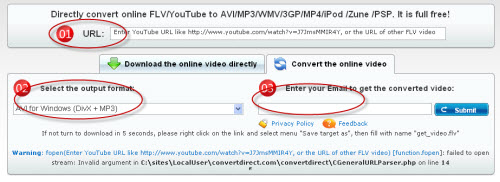
It is also a good way to grab YouTube and convert YouTube FLV/F4V automatically to AVI, 3GP, MP4, MP3, WMV or other video formats. There is no any annoying complicated operating process. For example, the online free YouTube grabber and converter: http://www.convertdirect.com/ just three steps:
1. Type in the URL of YouTube.
2. Select the output format.
3. Enter your email address to receive converted videos.
At last, one click to submit is needed only.
In this way, you do not have to learn about how to operate the software or other troubling things. You can get the grabbed and converted YouTube videos without any effort. The only disadvantage is that you have to wait for some time. You can not get it at once until you receive an email containing the download link for the converted files.
Use the free download software – Foxreal YouTube FLV Downloader:
It is the most popular method to auto-grab and free download YouTube videos. I recommend you to use Foxreal YouTube FLV Downloader which is totally free. Compared with those two methods, it can save you much time and less efforts. The downloading process is fast and the program can batch grab YouTube automatically for downloading. Now let’s see how to use this free YouTube downloader program.
1. Run the YouTube downloading program.
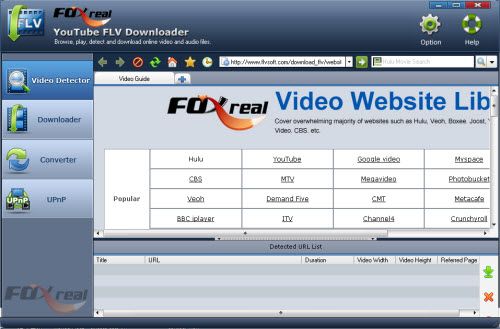
2. Open the online video site you want to download.
From Foxreal Video Website Library, you can quickly go to the popular video-sharing websites to view the video you want to download, like YouTube, Myspace, Facebook, iFilm, MSN, Dailymotion, Google, Yahoo! Video, MTV and more.
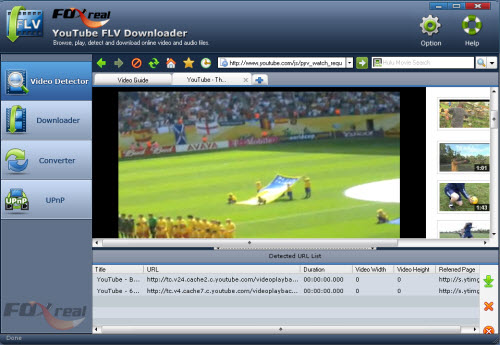
When the online video URL is auto-captured by the program, you can click  button to create the download task(s) in New Download dialog-box. Batch download is also supported.
3. Set output settings for download.
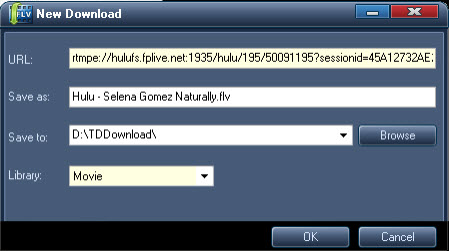
Click “OK” to start YouTube downloading once the output settings are finished. You can see the download status in “Downloading” tab.
4. Find grabbed/downloaded YouTube video in “Downloaded” tab for playback.

5. Convert downloaded YouTube FLV/F4V with FLV to Video Converter Pro 2.
You can get more detailed information about how to use FLV to Video Converter Pro 2 by clicking here: /flv_to_wmv/
The three ways to grab YouTube are all free. You can choose one way you like to meet your need. Just enjoy them.
Tips
- How to Play FLV files Online with Moyea Flash Video MX
- How to Convert Youtube Video FLV to 3GP for Playback on your Nokia N70?
- FLV to iPhone 4 - Convert FLV to iPhone 4 with Best FLV to iPhone 4 Converter
- How to Convert Youtube Video FLV to MP4 for Playback on your Sagem MY 900C?
- Best Galaxy S Video Converter - Put and Play Video on Samsung Galaxy S
- MTS to Samsung Galaxy S - Convert MTS files to Galaxy S for Playback
- How to convert M2TS to AVI on PC?
- AVCHD to Adobe Premiere - Import AVCHD MTS to Adobe Premiere
- Best AVCHD to DVD Converter - Convert MTS to MPG, Convert M2TS to MPG
- Best MOV to Galaxy S Converter - Play QuickTime movies on Samsung Galaxy S
