Promotion


Pavtube FLV/F4V Converter
Pavtube CUDA FLV Converter now can convert all encoded FLV/F4V videos to other video formats like MOV, MP4, MKV, WMV, AVI, DVD, VCD, SVCD, FLV (Sorenson H.263), FLV (H.264), SWF etc with ease.

How to Convert YouTube FLV to 3GP for Playback on Nokia N70
Nokia N70 has up to 22 MB of internal dynamic memory for images, ringing tones, images, and video clips, etc. So it is easy to enjoy the stylish music and videos on your N70.
What file formats does N70 support?
Audio: MP3, AAC, WAV
Video: AVI, RM, 3GP, MP4
What is FLV?
There are many funny videos on YouTube, Google Video, MySpace, etc. They are in FLV format which is designed for web playback, offering high rates of compression yet ensuring the quality.
FLV files can’t be played on N70 directly. Fortunately, Moyea FLV to Video Converter is an easy-to-use tool which can convert FLV to AVI, 3GP, MP4, MP3, AAC, WAV, etc. You can download Flash Videos from YouTube, Google Video, and MySpace, etc, by the free software FLV Downloader. Now, follow the simple steps to enjoy the Flash Videos on your funny N70 freely.
1. Click “Add FLV” button on the top left corner to import.
Double click the video for an instant preview.
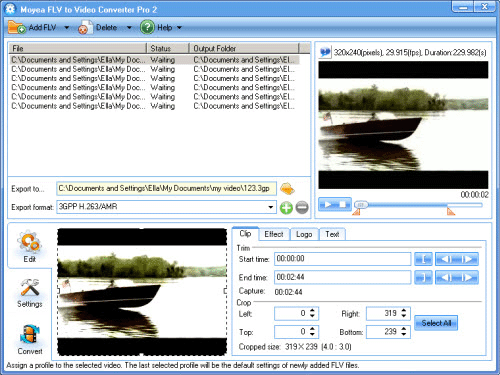
2. In the bottom-left window, drag the line to select part of the video where you want. Then you can add logo and text to the video in the red pane, the video effects also can be adjusted here.
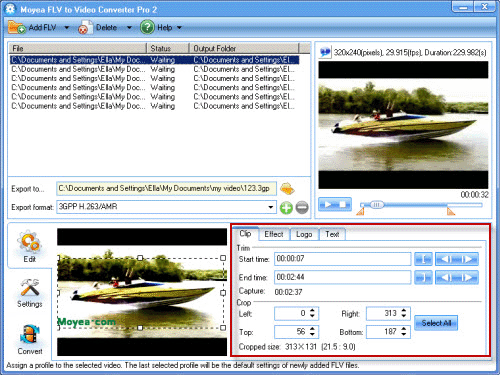
3. Click “Settings”, and then click  to set the destination. Choose 3GPP from the “Export format” drop-down list, and you can set the audio and video parameters.
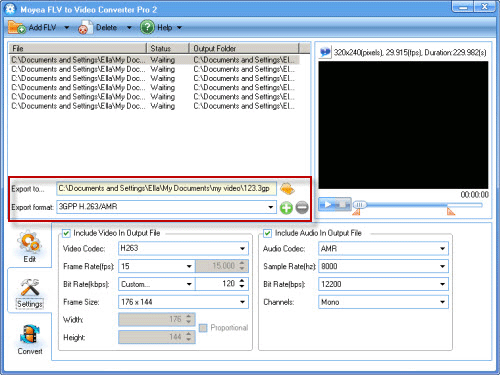
4. Click “Convert” and then click “Start” to convert the FLV files one after another. After a moment, the conversion will successfully complete. Then put the converted files on your N70, and enjoy it anytime.
Tips
- FLV to Cell Phone: Convert FLV(Flash Video) video to Cell Phone with Moyea FLV Converter for Cell Phone
- Best Droid X Video Converter - Transfer and play videos on Motorola Droid X
- FLV to DS : Convert FLV to DS with Moyea FLV to Video Converter
- Best way to convert M2TS to MKV without quality loss
- How to play flv offline?
- FLV to 3GP: Convert FLV to 3GP with Pavtube FLV to Video Converter
- FLV Player Help
- FLV to WMV - Convert FLV to WMV (Windows Media Video)
- Free FLV Youtube Downloader - 100% FREE YouTube Downloader
- FLV to PSP - Enjoy Flash Video FLV from YouTube and Google Video on your PSP