Promotion


Video Converter
Pavtube Video Converter supports to do editing and converting between almost all popular video, audio and image files at a 1.5 or even 2 times faster speed, like TiVo, MKV, FLV, MOV, WMV, AVI, MPEG, MPG, VOB, F4V, 3GP, ASF, SWF, etc.

Get a Samsung Galaxy S and want to enjoy videos on the Galaxy S? Or, attemp to watch your holiday videos on the Galaxy S after a wonderful vacation? Okay, the guide will do a favor for you. It will show you how to put and play video files on Galaxy S by using a powerful Galaxy S Video Converter with ease.
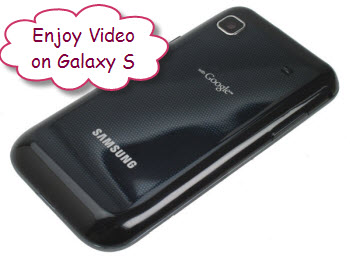
First, we should know that the Samsung Galaxy S only accepts limited video/audio formats, like 3GP, AVI, MP4, FLV, WMV, MKV. So, if you want to enjoy other video formats on Galaxy S, the easiest method is to convert video to Galalxy S workable formats.
Now, please free download Galaxy S Video Converter here, install and run it. The main interface will show as below:
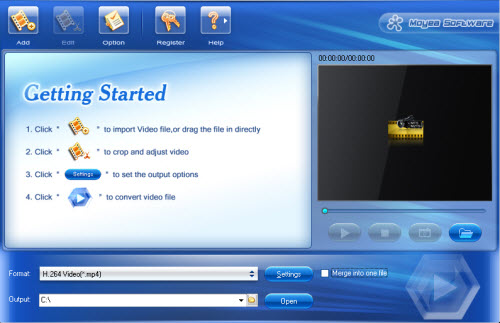
Step 1: Click “Add” to load video files into this program
Step 2: Choose Galaxy S video format
Click “Format” to select the best video format for Galaxy S. Here H.264 Video (*.mp4) is recommended, for MP4 is widely used and accepted by lots of media devices. If you want to get a smaller size video, you can click “Settings” to set the resolution as 480*320 to fit the display size of the Glalaxy S for great enjoyment.
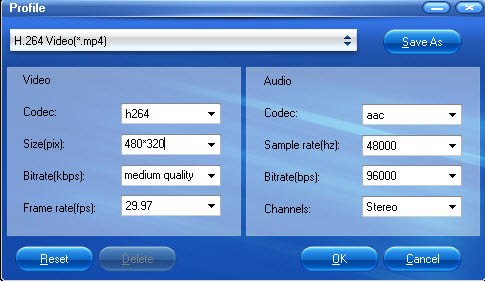
Step 3: Start Video to Galaxy S conversion
After the necessary settings, you are allowed to click “Convert” to begin converting video to Galaxy S. Within a short time, you will get the converted files from the default folder by clicking “Open”. Then, you are able to transfer video on Galaxy S for playing.
PS: The best Galaxy S Video Converter supports MTS to Galaxy S conversion, M2TS to Galaxy S conversion, MOV to Galaxy S conversion, MOD to Galaxy S conversion, HD to Galaxy S conversion, and more.
Tips
- How to use FLV Editor Pro quickly and skillfully
- How to convert RM to FLV Flash Video to Share Online with Moyea Flash Video MX
- How to Free Merge FLV ?
- Get 1080p Videos onto iPad for Playback - 1080p to 720p Converter for iPad
- MKV to DivX Converter - Convert MKV to DivX with good quality
- FLV to 3GP: Convert FLV to 3GP with Pavtube FLV to Video Converter
- Best FLV to iPad Converter - Convert FLV to MP4 for iPad
- FLV to DivX AVI Converter - Convert YouTube FLV to DivX without quality
- FLV to MOV - Convert FLV to MOV(QuickTime Movie) with FLV to MOV Converter
- Best Flash Video Downloader - Capture and save online video to PC