Promotion


FLV Editor Pro
FLV Editor Pro is the fantastic conversion tool for edit FLV. Along with the program, you can convert FLV to AVI, FLV to MPEG, FLV to MP4, FLV to WMV, FLV to MP3, et as well as edit FLV by its powerful editing functions.

Two free functions for this FLV Converter:
We will often see these words like free try, trial version, etc in the web site for software selling. In order to protect the copyright, the watermark are always printed on the trial version including image, text and sound. Time limit is contained as well, sometimes. Moyea FLV Editor Pro includes the trial version and full version.
However, it provides two free functions in trial version:
No watermark and interferential sound! No time limit! Same as the full version for these two free functions!
Convert FLV to FLV:
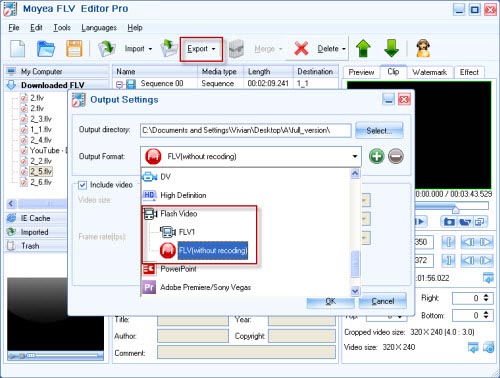
FLV Editor Pro can convert FLV to FLV or output original FLV without recoding. The later is providing the free functions. No watermark and no time limit! If just want to join multiple FLV and trim the length of video clips, then FLV Editor Pro couldn’t be better choice!
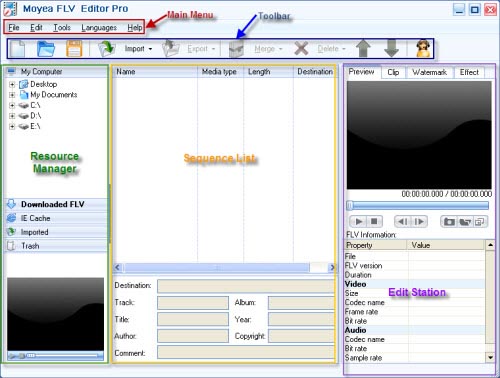
The main interface of FLV Editor Pro:
1. How to join FLV files:
After importing FLV files into the sequence list, click “Merge” icon and select “Merge” for merging and cutting or “Copy Merge” for copying and merging. Note: before merging, you must first select video clips. (Not the sequences).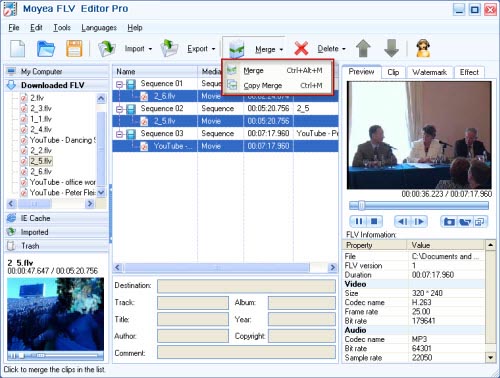
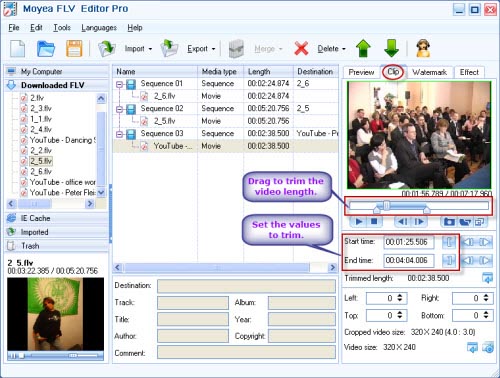
2. Free trim FLV files:
3. How to output FLV without recoding:
Really free FLV Joiner and trimmer!
Are you interested in the command line program for merging FLV files? Here is another FREE program: FLV Binder! The complete solution of the command line for joining FLV!
Tips:
What is watermark?
A watermark referred to here is a recognizable image, text, or sound, which identifies the file’s information like copyright, author, etc. Usually the purpose of watermarks is to provide copyright protection for various kinds of “products”, especially in software industry.
Solution for Vista system:
This FLV converter program is not only for XP system, but also for Vista. Let you use it more freely, regardless of XP users or Vista users. Enjoy your Vista System with the converter tool, bring you the fantastic feelings! Do not hesitate! Vista users!
Tips
- How to convert video to Flash (swf) and Flash video (flv)?
- AVI to FLV Converter Offers Solutions to Create Flash Video FLV from AVI file
- Free download MSN video with best MSN Video Downloader
- Convert Flash Video FLV from YouTube to wmv for iRiver
- Flash Video Converter - Make Flash SWF, Flash Video file with Flash Video MX Pro
- How to convert RM to FLV Flash Video to Share Online with Moyea Flash Video MX
- Free download and convert online FLV to other video formats
- Convert AVI to Flash with various player settings!
- Convert Flash Video FLV from YouTube to wmv for Cowon iAudio D2
- AVCHD to Samsung Galaxy Tab - Put/Play AVCHD MTS/M2TS files on Galaxy Tab