Promotion


Video Converter
Pavtube Video Converter supports to do editing and converting between almost all popular video, audio and image files at a 1.5 or even 2 times faster speed, like TiVo, MKV, FLV, MOV, WMV, AVI, MPEG, MPG, VOB, F4V, 3GP, ASF, SWF, etc.

The HTC Desire HD, as expected, featured a 4.3” display, is obviously slightly larger than its original HTC Desire. Besides the change to the display, the HTC Desire now shoots 720p video alongside 8MP stills with dual flash. Aesthetically, the HTC Desire HD looks pretty much identical to the HTC EVO, however for those that are unfamiliar with the EVO, you will notice that it is a fully black device, rather than the bronze-ish tint to the original HTC Desire.
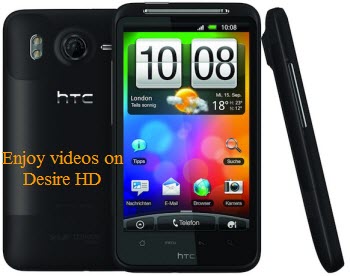
Further, from the HTC Desire HD specs, you will find the detailed information about HTC Desire HD audio supported formats and video supported formats as below:
Audio supported formats:
Playback:.aac, .amr, .ogg, .m4a, .mid, .mp3, .wav, .wma (Windows Media Audio 9)
Recording:.amr
Video supported formats:
Playback:.3gp, .3g2, .mp4, .wmv (Windows Media Video 9), .avi (MP4, ASP and MP3), .xvid (MP4, ASP and MP3)
Recording:.3gp
Like other smartphones, the HTC Desire HD only supports limited video and audio formats. If you want to enjoy videos on HTC Desire HD, like TiVo, AVCHD MTS, M2TS, MKV, MOV, DVD, VOB, FLV, F4V, etc., you have to use a powerful HTC Desire HD Video Converter tool to convert videos to HTC Desire HD.
Now, the following article will show you an easy method of converting video files to Desire HD with the Best Video to Desire HD Converter tool which is able to convert AVCHD MTS/M2TS to HTC Desire HD, MKV to HTC Desire HD, MOV to HTC Desire HD, DVD to HTC Desire HD, FLV to HTC Desire HD and more without quality loss.
First, please free download Video to HTC Desire Converter here, install and run it. Its main interface will show as below:
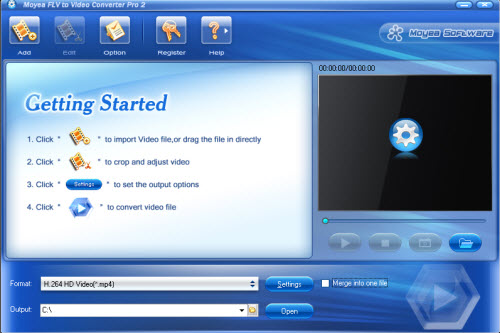
Step 1: Load video files into this program
Step 2: Choose output format for HTC Desire HD
Click “Format” drop-down list, you are allowed to easily select your desired output format according to your media devices. For the HTC Desire HD, H.264 HD Video (*.mp4) is recommended for its high definition quality.
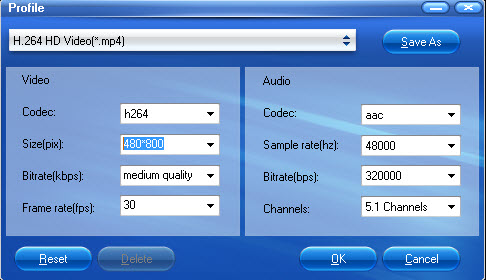
Note: If you like, you can also click “Settings” to set the file resolution as 480 x 800 to fit the display screen of the HTC Desire HD for the greatest enjoyment. Click “Save as” button on the Setting panel to save the settings for next use by default.
Step 3: Convert video to HTC Desire HD
After the necessary settings, you are able to start video to HTC Desire conversion. Just for a while, you can get the converted files from its default folder, and then you can put and play the MP4 files on HTC Desire HD for playing.
Tips:
Edit – Allow you to edit your video files by using some powerful editing functions, like crop/trim video clips, add watermarks/effects, replace audio file, deinterlace and so on.
Merge into one file – Join/combine video clips into a single one
If you are Mac users, there is another alternative tool – Mac HTC Desire HD Video Converter which will be you best choice.
Tips
- How to Convert FLV to MPG?
- How to Convert Youtube Video FLV to MP3 for Playback on i-Mate SPJAS Mobile Phone?
- FLV to Wii : Convert FLV to Wii with Moyea FLV to Video Converter
- How to put videos on your website?
- How to Extract Audio from FLV Video to MP3 audio?
- FLV to WMV - Convert FLV to WMV (Windows Media Video)
- How to Edit FLV with FLV Converter?
- How to Convert Youtube Video FLV to MP4 for Playback on your Sagem MY 900C?
- How to Capture FLV (Flash Video) from YouTube onto Your Computer
- Extract YouTube Flash Video FLV to mp3 for Creative Zen Neeon 2 MP3 player