Promotion


MTS/M2TS Converter
Pavtube MTS/M2TS Converter is an friendly, stable and powerful tool to help you enjoy high-definisiton MTS/M2TS videos from AVCHD folders or Blu-ray movies anywhere anytime on your iPad, iPhone, iPod, BlackBerry, Nexus One, HTC, etc easily.

Have you imagined sharing your videos recorded by your camcorder to the internet with your net friends? Or do you want to play your MTS or M2TS videos on your PC, laptop, iPod, iPhone, iPad, or other portable devices?
Do not worry. The Moyea MTS Converter will be your good choice, which allows you to convert MTS to FLV for uploading, convert MTS to MP4 for playback on all MP4 players, and convert MTS to AVI, MPEG, MPG, QT, MPEG-2, MPEG-4, MOV, WMV, WAV, DivX, MP3, etc.
How to convert MTS to FLV via the Moyea MTS/M2TS Converter tool?
Step 1: Download and install the MTS to FLV Converter. Run it.
Step 2: Select output format as FLV
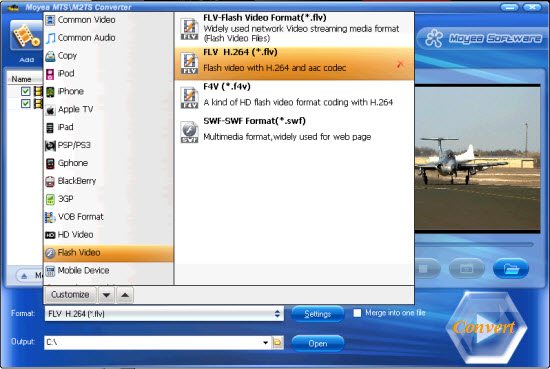
Step 3: Adjust audio/video parameters
Click “Settings”, you are able to adjust resolution, aspect ratio, bitrate, frame rate, file size, codec and more to get better video quality. Remember the larger bitrate, the bigger file size while the better output quality.
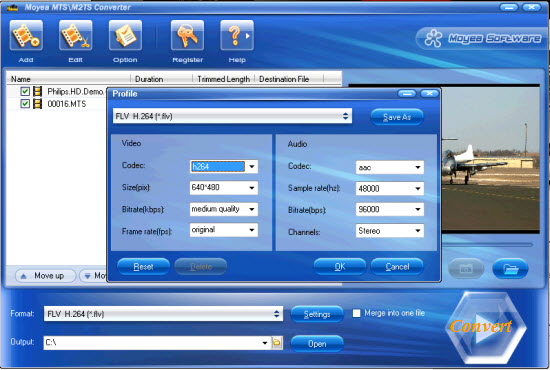
Step 4: Convert
Click “Convert” to beginning MTS to FLV conversion. Or, you can join MTS files to a single one by ticking “Merge into one file” next to “Convert”.
That’s all. Hope it helps!
Tips
- Share an easy solution to convert DVD to YouTube for uploading
- Play H.264 File with Moyea FLV Player
- How to convert mkv to avi with Moyea MKV Converter?
- AVCHD to Sony Vegas - Convert/Edit AVCHD MTS/M2TS files for Sony Vegas
- Best AVCHD to iPhone 4 Converter - Convert AVCHD to iPhone 4
- FLV to Sansa : Convert FLV(Flash Video) video to MOV for Sansa
- How to Convert FLV to MP4 for Playback on iPod?
- Convert FLV to Pocket PC and enjoy your favorite FLV movies whenever you want
- FLV to PSP - Enjoy Flash Video FLV from YouTube and Google Video on your PSP
- How to convert M2TS to AVI on PC?