 Promotion


If you have an iPod or you are planning to have one, you can easily and freely enjoy plenty of video materials such as music, movies, video clips or television shows on them. Then it is a good idea to download streaming videos off the popular video sharing sites, YouTube, Dailymotion, Google Video, Yahoo! Video, etc, for playback on your iPod when you are on the move: waiting in a long queue, sitting in the waiting room of airport, etc. And the article will do a favor for you if in that cases. Now follow and enjoy it.
How to downlaod FLV videos?
By the assistance of FREE FLV downloader program: Foxreal FLV downloader, it will download videos from youtube, Google Video, Myspace, Metacafe, Dailymotion, iFilm, Music, eVideoShare, StreetFire, etc. to your computer's hard drive in flv format - use FLV Player to view it. Foxreal FLV Converter with CUDA support is such a FLV conversion tool which allows you to obtain the excellent quality and output size in converting FLV to iPod movie. But generally speaking, the higher the picture and audio quality are, the longer it will take to convert. The present page is to graphically show you how this product will offer you the solution to converting online FLV movies to MP4 iPod video via the Foxreal FLV to MP4 Converter. First of all, please download and install the Foxreal FLV to MP4 Converter here. Then launch it. The main interface will pop up as below:
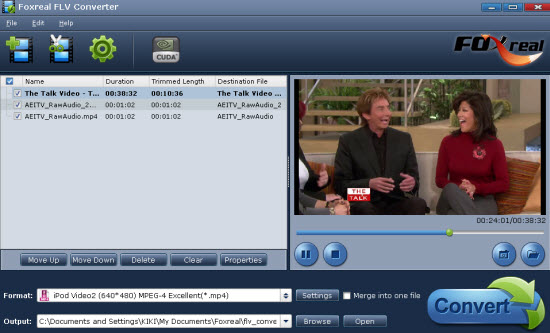
1. Load your FLV files into this FLV to iPod Converter program
2. Select output format as MP4 for iPod and set destination folder
From "Format", you are able to choose your desired output format MP4 for iPod as well as set the destination folder from "Output". Otherwise, the output files will be saved in the default folder.
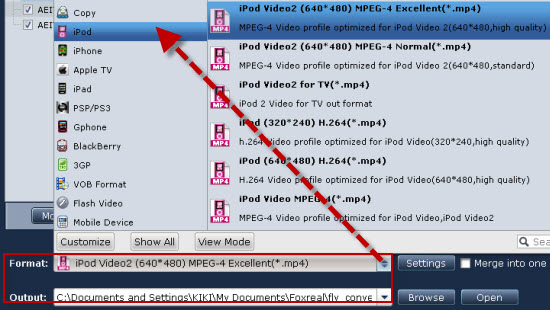
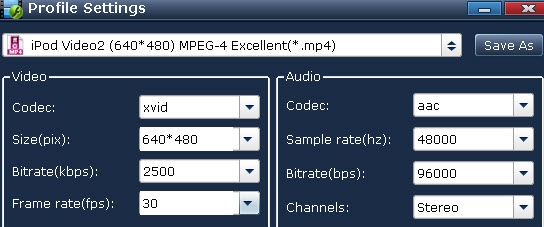
Hint: Click "Settings" to open the output setting profile where you are allowed to set the bitrate, codec, file size, frame rate and audio channels with ease. Please remember the larger bitrate, the bigger file size companying with the better output quality. 3. Start FLV to iPod conversionWith this CUDA FLV to iPod Converter program from Foxreal Software, conversion of FLV to MP4 iPod movie is merely a 3-step process. And what you need to do at last is to import the encoded iPod MP4 movie into your cute iPod player with iTunes and sit back to enjoy. What's more, you can also use the FLV to MP4 Converter to convert FLV to iPad, convert FLV to iPhone 4 and more.
Hopefully the article will be of great help for you. Good luck!
